PIC-MC Manual / General workflow
For DSMC-Gasflow simulation, PIC-MC plasma simulation or BEM magnetic field computation, different work flows are required. Depending on the usage of a Grid Scheduler or direct call of mpirun, the invocation commands may differ. In the following, the work flows and invocation commands for the different simulation cases are summarized.
DSMC gas flow simulation
The work flow in a DSMC gas flow simulation can be summarized as follows:
| Step | Description | Command via mpirun | Command via LSF batch system |
|---|---|---|---|
| 1 | Create geometric mesh file via GMSH (see example) and save mesh file as filename.msh | ||
| 2 | Create parameter template filename.par out of mesh file filename.msh | initpicmc filename | |
| 3 | Edit parameter template (see example) | ||
| 4 | Start simulation | rvmmpi -hostfile <hostfile> -picmc <n> filename | rvmlsf -picmc <n> -i filename |
| 5 | Create intermediate results during simulation | touch filename/plot | |
| 6 | Shutdown simulation and store internal state for later continuation | touch filename/shutdown | |
| 7 | Restart a simulation after shutdown (equal to step 4) | rvmmpi -hostfile <hostfile> -picmc <n> filename | rvmlsf -picmc <n> -i filename |
The number of parallel picmc tasks, which should be used during
computation are given in the <n> parameter after the -picmc switch.
Remember that the number of parallel picmc tasks may not exceed (but
may be less than) the number of segments of the simulation domain. The
actual number of allocated CPU cores will be one more than the number of
picmc tasks, since one more task is required for the master process.
If the simulation is invoked directly via mpirun using the rvmmpi
script, a hostfile must be declared. This hostfile contains the names
of the computing nodes together with their available number of CPU
slots. An example is given in the following:
node1 slots=1
node3 slots=48
node4 slots=48
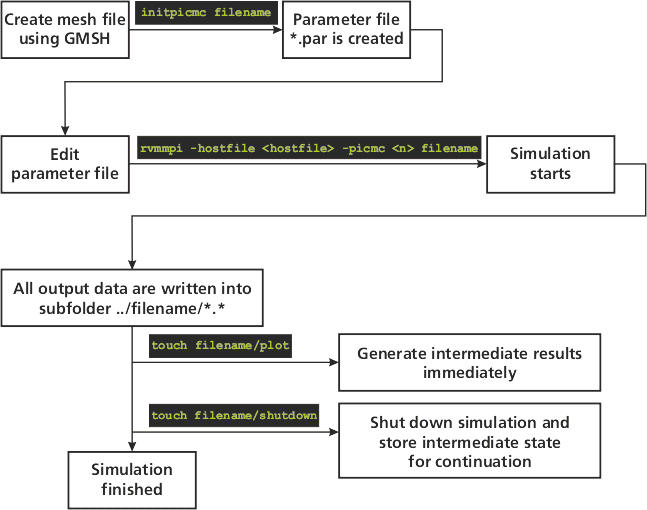
If a batch scheduler such as LSF or Sun Grid Engine (SGE) is used, no hostfile must be specified since the hostfile will be created dynamically by the scheduler. A graphical visualization of the work flow is given in the following picture.
PIC-MC plasma simulation without magnetic field
For a PIC-MC plasma simulation without magnetic field (e. g. in a PECVD parallel plate reactor or a glow discharge without magnetic field), the workflow is the same as in the DSMC case.
PIC-MC plasma simulation with magnetic field
For a plasma simulation with an overlying magnetic field - e. g. a discharge of a magnetron sputtering target - additional steps for producing the magnetic field are required prior to starting the picmc simulation. The complete workflow is summarized in the following:
| Step | Description | Command via mpirun | Command via LSF batch system |
|---|---|---|---|
| 1 | Create geometric mesh file of the simulation domain (e. g. frame.msh) via GMSH and save mesh file e. g. as frame.msh | ||
| 2 | Create mesh file of the magnetron arrangement (e. g. magnet.msh) via GMSH and save mesh file e. g. as magnet.msh | ||
| 3 | Create parameter template frame.par out of mesh file frame.msh | initpicmc frame | |
| 4 | Edit parameter template. Fill in the name of the magnetic mesh file in the field BEMMESH | ||
| 5 | Create a template file frame.bem, where the relation between surfaces and magnetic domains will be declared | initbfield frame | |
| 6 | Edit the magnetic template file frame.bem | ||
| 8 | Perform magnetic field computation | rvmmpi -hostfile <hostfile> -bem <n> frame | |
| 9 | Start PIC-MC simulation | rvmmpi -hostfile <hostfile> -picmc <n> filename | rvmlsf -picmc <n> -i filename |
| 10 | Create intermediate results during simulation | touch filename/plot | |
| 11 | Shutdown simulation and store internal state for later continuation | touch filename/shutdown | |
| 12 | Restart a simulation after shutdown | rvmmpi -hostfile <hostfile> -picmc <n> filename | rvmlsf -picmc <n> -i filename |